Applied AI Surveillance & Alert Automation

Actionable AI Video Analytics for Existing CCTV Networks

SARSSPL turns multi-site RTSP/ONVIF camera streams into structured security and safety workflows—detecting intrusions, fire or smoke cues, PPE gaps, and access exceptions with clear operator escalation.

RTSP / ONVIF
Works with standard IP cameras & NVRs
On-Prem / Edge
Local processing with audit logs
Alert Workflows
Operator review & ticket dispatch
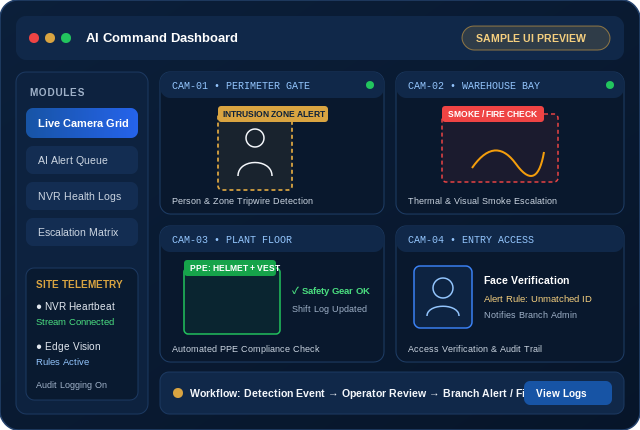
UI Telemetry Preview AI Event Feed
Pre-Launch Sample View
AI Telemetry Dashboard Preview
Representative command UI mockup. Live RTSP stream accuracy and alert latency are validated on your site cameras during pilot testing.
Core AI Surveillance Modules

Four Practical Vision Workflows

Each module pairs camera event detection with operator-verifiable snapshots and escalation routing inside the Comfort E-Surveillance Portal.

Person & Intrusion Detection

Perimeter Vision
CAM-GATE-02 Sample Telemetry UI
ZONE BREACH
Restricted perimeter entry flagged for operator review

Detect unauthorized human entry in restricted zones or after-hours perimeters and trigger structured operator alerts.

  • Zone & tripwire boundaries
  • After-hours entry notifications
  • Operator alert verification log
Sample interface preview — live RTSP/NVR stream tested during guided demo.

Fire & Smoke Alerts

Safety Vision
CAM-WH-04 Sample Telemetry UI
THERMAL / SMOKE CUE
Visual smoke plume candidate routed to safety desk

Visual flame and smoke anomaly flagging integrated with command-center escalation workflows for rapid human review.

  • Early visual smoke/flame cues
  • Warehouse & server room zones
  • Multi-channel escalation alert
Sample interface preview — calibrated against site lighting during deployment.

PPE Compliance Detection

Industrial Safety
CAM-BAY-01 Sample Telemetry UI
PPE CHECK
Missing hard-hat / vest flagged at assembly entry

Identify missing safety helmets or high-visibility vests at factory floors and entry gates to support safety audits.

  • Helmet & safety-vest checks
  • Shift-wise compliance logs
  • Non-compliance snapshot review
Sample interface preview — configured for site camera angles on rollout.

Face Verification & Automated Alerts

Access & Escalation
CAM-VAULT-01 Sample Telemetry UI
ACCESS LOG
Unrecognized entry event queued for supervisor audit

Staff/visitor verification workflows paired with automated exception notifications and centralized audit records.

  • Authorized entry verification
  • Unrecognized visitor alerts
  • Centralized event timeline
Sample interface preview — governed by client access policies.
Capability 01 • Perimeter Security

Person & Intrusion Detection

Define virtual tripwires and restricted-hours zones across existing IP cameras. When human entry is detected outside scheduled shifts, the portal captures an event snapshot and notifies designated operators.

Virtual Perimeter Zones

Configure entry lines around gates, cash rooms, server racks, and loading bays.

Schedule-Aware Rules

Arm after-hours intrusion alerts automatically based on branch operating schedules.

Workflow Output

Intrusion Alert Telemetry

  • Camera ID, branch name, and timestamped snapshot
  • Operator acknowledgment status & escalation log
  • WhatsApp / SMS / central portal notification
Book Intrusion Demo
Safety Escalation

Fire & Smoke Alert Routing

  • Visual smoke and flame candidate flagging in camera view
  • Rapid visual confirmation queue for control room staff
  • Integrates alongside existing physical fire panels
Note: Designed as an early visual aid to complement—not replace—certified fire detection hardware.
Capability 02 • Facility Safety

Fire & Smoke Detection Alerts

High-ceiling warehouses, factory bays, and electrical rooms often delay ceiling smoke sensors. Camera-based visual smoke and flame cues give monitoring desks immediate visual context so teams can verify and respond faster.

Book a Demo
Capability 03 • Industrial Safety

PPE Compliance Detection

Monitor factory entrances, assembly lines, and loading zones for missing safety helmets or high-visibility vests. Exceptions are logged with timestamps and snapshots to help safety officers run consistent audits.

Helmet Detection Safety Vest Check Shift Audit Logs
Safety Audit Output

What Safety Teams Receive

  • Zone-level missing PPE exception snapshots
  • Shift and gate summary logs for EHS review
  • Calibrated to site camera angles during rollout
Book PPE Walkthrough
Access & Policy

Verification & Alert Controls

  • Authorized staff / VIP verification at entry points
  • Unrecognized visitor alerts for security desks
  • On-premise template storage governed by client policy
Capability 04 • Access Workflows

Face Verification & Automated Alerts

Support controlled entry at vaults, server rooms, clubs, or restricted zones by comparing entry camera frames against authorized personnel rosters and logging exceptions for human review.

Book a Demo
Enterprise AI • Operations

Predictive & Operational Analytics

Beyond video analytics, SARSSPL connects ERP, POS, and field service databases to surface low-stock warnings, recurring equipment fault patterns, and branch SLA bottlenecks—helping managers act early without manual spreadsheet crunching.

Inventory Reorder Signals Equipment Fault Trends SLA Bottleneck Alerts

Connected With Your ERP & Portal

Analytics modules sit directly on top of your CSS Operations ERP, Srishringarr POS, or Comfort E-Surveillance data—no external third-party SaaS data export required.

Explore Enterprise Platforms
Alert Workflow Architecture

From Camera Frame to Verified Action

A structured 4-stage pipeline ensures alerts reach operators cleanly with visual context and audit traceability.

Stage 01

Stream Ingest

Connect existing RTSP/ONVIF IP cameras and NVR feeds alongside device heartbeat checks.

Stage 02

Edge / Server Detection

Run person, intrusion, fire/smoke, PPE, or face verification rules on local or private-cloud nodes.

Stage 03

Operator Verification

Surface event snapshots in Comfort E-Surveillance Portal so operators confirm real incidents.

Stage 04

Escalation & Ticket

Dispatch WhatsApp/SMS notifications or create a field engineer ticket with full audit timestamps.

Engineering Stack

Proven Open-Source & On-Premise Tooling

Built with maintainable vision and backend technologies you can deploy on-premise or in private cloud.

Python & OpenCV

Asynchronous stream ingestion, frame pre-processing, and vision pipeline workers.

YOLO & PyTorch

Object detection and pose/PPE models tuned to real site camera angles.

RTSP / ONVIF

Standard protocol support across existing CCTV cameras and NVR recorders.

PHP 8 & MySQL

Centralized portal dashboards, incident logs, user permissions, and escalation rules.

Guided Pilot Evaluation

Test AI Surveillance on Your Camera Feeds

Share your camera count, lighting conditions, and target alerts. Our engineers will recommend hardware sizing and run a structured pilot validation before full rollout.

  • Camera & NVR compatibility check (RTSP/ONVIF)
  • Live walkthrough of Comfort E-Surveillance Portal
  • Clear on-premise or private-cloud deployment plan

Request an AI Pilot Assessment

Provide your environment details so our engineering team can prepare a relevant demo.

Book a Demo WhatsApp